Your AI builds the site, Zugo puts it online
In a chat, your Claude or Codex hands you code and leaves the rest to you. Connect Zugo and the same AI publishes the site itself: a live address, form requests delivered to you, your own domain. $12 a month.
$12 a month, cancel any time. Also included in Pro and Business.
What changes when your AI is connected to Zugo
| Topic | Chat alone | With Zugo |
|---|---|---|
| Where the site lives | Code in a chat window. To show it to people you need hosting and you upload the files yourself | You write “publish it” and the site opens at name.zugo.run |
| Requests | The form on the page sends nothing anywhere: it needs a server of its own | A form request is saved in your Zugo account and you get an email |
| Changes | Every change is new code you have to upload somewhere again | “Change the price to 1,500”: the site updates about a minute later |
| Your AI's limits | For every change the AI rewrites the whole page | The AI sends only the changes, Zugo keeps the rest |
| Design | From a blank page, hit or miss | 40 ready templates by industry: the AI picks one and changes the texts, prices and contacts |
| Domain | Buying, setup and the certificate are on you | Your own domain is connected in the site's settings |
| Checks | The AI's mistakes go online as they are | Before publishing, Zugo checks the page and will not release it with a secret key inside |
| What happens on the site | Your AI has no idea whether people visit the site or what they write | Ask “how many visitors and what requests came in”: your AI reads the statistics and the requests right in the chat |
| Bookings, menu and prices | You need your own database: an account, setup and keys | The site already has a database: every visitor sees taken time slots, and the menu and prices change with one phrase, with no new publish |
All of this for $12 a month: up to 10 sites, cancel any time. You need your own Claude or Codex; Zugo does not sell them.
Three steps
Connect
Add Zugo as a connector in Claude or as a tool in Claude Code and Codex. Your connection address is in Zugo settings, under “Your own AI”.
Ask your AI
Say it in plain words: “Build a coffee shop site and publish it to Zugo”. Your AI picks one of our templates and follows our layout rules.
The site is live
Zugo checks the markup and hosts the site at name.zugo.run. You can connect your own domain next.
How to connect, step by step
It takes a few minutes. Pick what you use.
Open “Your own AI” in Zugo
Sign in to Zugo, open “Connectors” and press “Connect” on the “Your own AI” banner. The same section is in Settings. Press “Create key”.
Open the section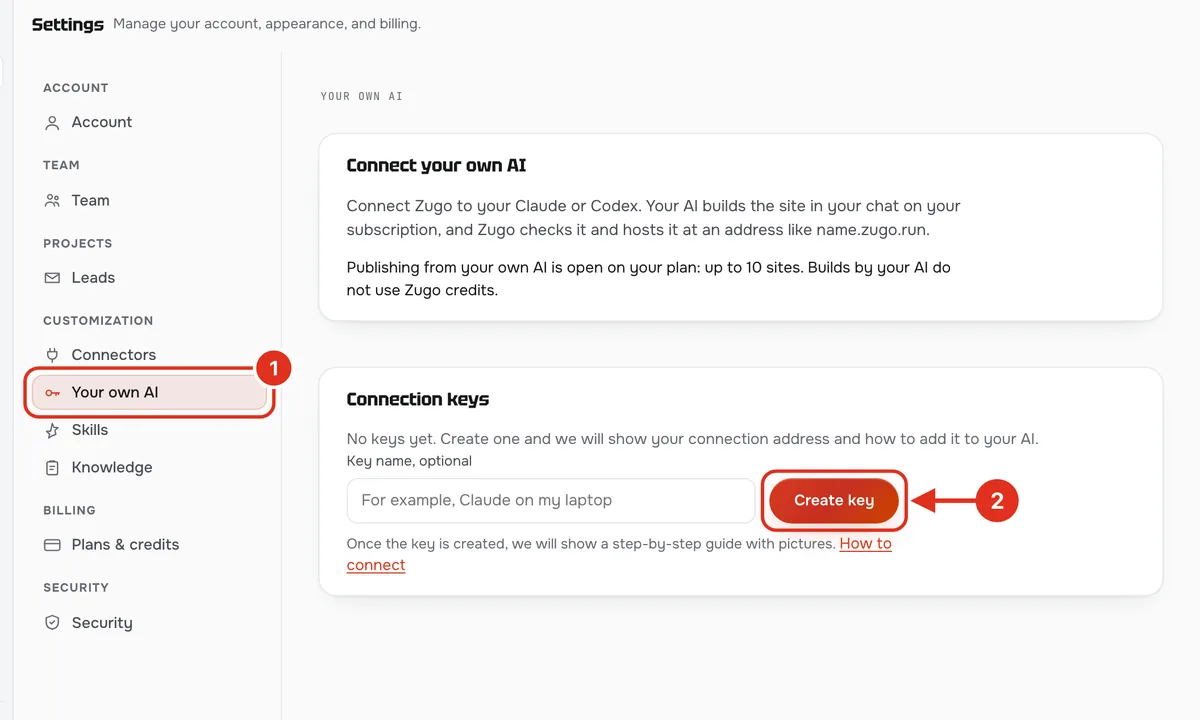
Copy the connection address
Zugo shows the address once. Press “Copy”. The address contains your personal key: do not send it to other people.
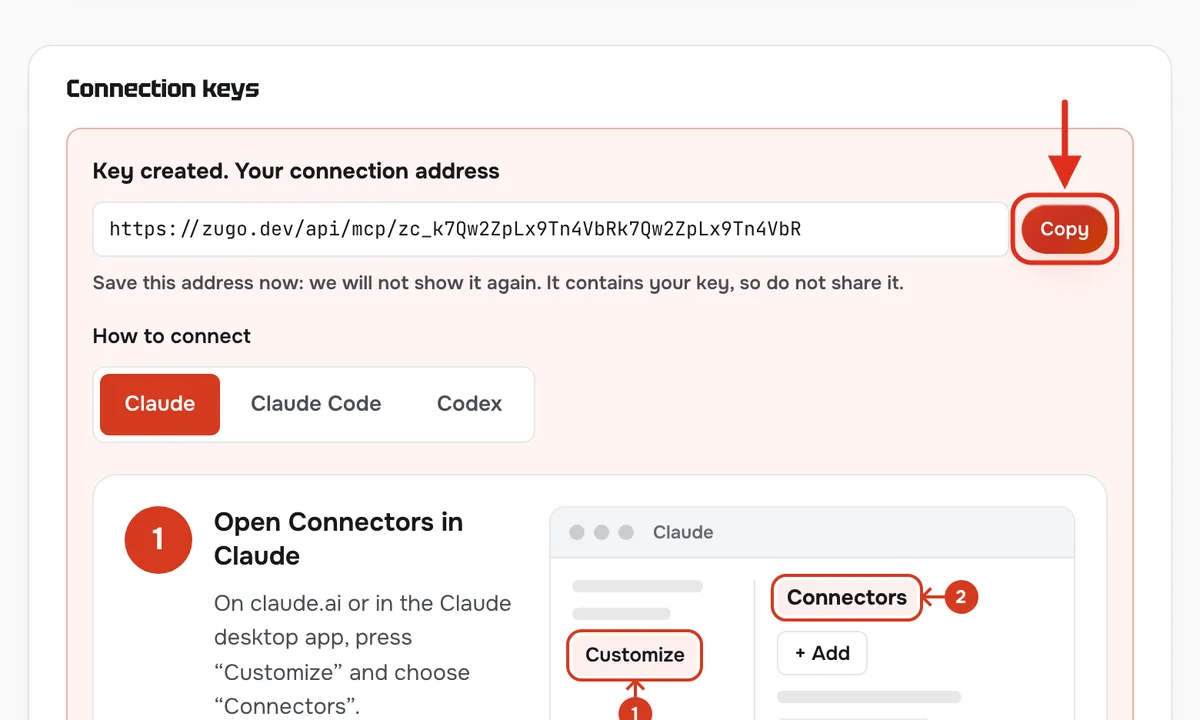
Open Connectors in Claude
On claude.ai or in the Claude desktop app, press “Customize” and choose “Connectors”.
CustomizeConnectors+ AddDiagram: the screen in your app may look slightly different. Add a custom connector
Press “+ Add”, then “Add custom connector”. Type Zugo as the name and paste the address from Zugo. Press “Continue”, and “Continue” again after the check.
Connectors+ AddAdd custom connectorNameZugoURLaddress from ZugoContinueDiagram: the screen in your app may look slightly different. Choose “No sign in” and press “Add”
There is nothing to sign in to: the key is already in the address. Under “Authentication” select “No sign in” and press “Add”.
AuthenticationNo sign inAddDiagram: the screen in your app may look slightly different. Turn Zugo on in a chat and ask
In a new chat press “+” at the lower left, open “Connectors” and turn Zugo on. Describe the site you need. When Claude asks permission to use a Zugo tool, press “Allow”.
+Build a coffee shop site and publish it on ZugoDone, the site is online: sunrise-coffee.zugo.runDiagram: the screen in your app may look slightly different.
What to tell your AI
In plain words. The more real facts you give, the less the AI invents.
Build a site for the Sunrise coffee shop in Austin and publish it on Zugo. Address: 10 Congress Ave. Phone: +1 512 555 0100. Open daily 8 am to 10 pm. Menu: espresso $3, cappuccino $4.50, latte $5. Add a table booking form: name, phone, time. Start from a suitable Zugo template. Site address: sunrise-coffee.
- The AI sends a link like name.zugo.run: the site is already online.
- Form requests: in Zugo, Settings → Leads, and by email.
- Changes: tell the same chat what to change. The site updates about a minute later.
If it did not work
- Claude does not see Zugo
- Open a new chat, press “+” → “Connectors” and turn Zugo on.
- The AI says a plan is needed
- Publishing is part of Connect, $12 a month: subscribe in “Your own AI” and ask the AI to publish again.
- The address reached someone else
- Revoke the key in “Your own AI” and create a new one. The old address stops working at once.
What Zugo adds that a chat cannot
Price
Connect
Bring your own AI- Up to 10 sites through the connection
- A name.zugo.run address and your own domain
- 40 templates and checks before publishing
- Cancel any time
The plan has no credits: building with Zugo's AI still uses credits. Connect is also included in Pro ($25) and Business ($50).
Questions and answers
Do I need my own AI subscription?
Yes. You need a Claude or ChatGPT subscription with Codex access. Zugo does not sell it: your AI runs on your own subscription.
Does it use Zugo credits?
No: your AI writes the site. The plan has no credits, and building with Zugo's AI still uses credits.
How many sites can I publish?
Up to 10 sites through the connection.
Where does the site live?
At name.zugo.run. Your own domain is connected in the project settings.
I already have Pro or Business
Connect is included in your plan. Create a key in settings, under “Your own AI”.
Can I cancel?
Yes, any time.